App Galore!

powerOne version 3

When it rains it pours. Last night powerOne version 3 went into review and out of review in about five minutes. We are very excited to announce it is now available for you to download from the App Store. I detailed the new features here but for a quick list:

  • Graph function equations, bar graphs and scatter plots. Zoom, pan, trace and evaluate. Implemented into many bundled and Library templates plus the ability to add graphing to your own custom templates.
  • Advanced math including programmer’s math, complex numbers, matrices, calculus, and more.
  • VoiceOver support.
  • Designate templates as favorites.
  • Filter the template list on a category or your favorites.
  • Custom categories when creating your own templates.
  • iPad retina graphics.
  • Finally, our Lite versions get In App purchase. We have bundled our most popular templates and are offering them for an introductory price of $0.99 per pack. Topics cover graphing, finance, conversions, mortgages, statistics, investing and more. The advanced math functions mentioned above are also available.

This is a very exciting upgrade for us and think the features we added are the cherry on top of the ice cream sundae! I hope you enjoy using it as much as we enjoyed creating it.

DEWALT Mobile Pro

Wait! But that’s not all!

I couldn’t be more excited to announce a special project we have been working on for more than a year. DEWALT Mobile Pro is a full-featured calculator and reference tool designed especially for construction professionals. It is a free app, including a fantastic construction calculator and various calculator templates for everyday area, length and volume computations. It also includes purchasable template packs that cover concrete, business math, carpentry and more.

DEWALT Mobile Pro was created in conjunction with two powerhouses in the industry. DEWALT, a division of Stanley, Black & Decker, is an amazing company with incredible name brand recognition in the construction trades. Their brands, including DEWALT, Stanley, Black & Decker, Price-Pfister and more, are all over every home improvement store I walk into. We also worked with Cengage Learning, the leaders in content publishing for the construction trades. Their reference and how-to books are on the shelf of construction professionals everywhere.

And this is why DEWALT Mobile Pro is such an exciting project. It isn’t every day we get to meld the brand name of a DEWALT with the content expertise of a Cengage into a fantastic app. I hope you will download it and check it out!
Apps to Apple: powerOne Version 3 Awaiting Review

Back to my regular programming tomorrow but … we shipped version 3 of powerOne Finance Pro and Lite and powerOne Scientific Pro and Lite to Apple today. Hopefully we’ll get a speedy review and have it available for all of you next week. This will make a very exciting week next week as we have another long-term project shipping as well, which I’ll tell you about next Wednesday.

I wrote previously about all the cool stuff going into version 3 of powerOne. Here’s a quick summary:

  • Graph function equations, bar graphs and scatter plots. Zoom, pan, trace and evaluate. Implemented into many bundled and Library templates plus the ability to add graphing to your own custom templates.
  • Advanced math including programmer’s math, complex numbers, matrices, calculus, and more.
  • VoiceOver support (I was told we are the first calculator to do this.)
  • Designate templates as favorites.
  • Filter the template list on a category or your favorites.
  • Custom categories when creating your own templates.
  • iPad retina graphics
  • Finally, our Lite versions get In App purchase. We have bundled our most popular templates and are offering them for an introductory price of $0.99 per pack. Topics cover graphing, finance, conversions, mortgages, statistics, investing and more. The advanced math functions mentioned above are also available.

All of the upgrades are free to current customers.

Announcing powerOne version 3

I’m proud to announce that in the next two weeks we will release powerOne version 3. While the look and feel will remain the same we have added some key features for our iPhone, iPod touch and iPad customers. This is a free update and hope you find these improvements as exciting as I do!

Graphing

The biggest new feature is the introduction of graphing. We offer function graphs, scatter plots and bar graphs. Graphing will be added to a number of existing templates plus our Scientific Pro customers will get a Function Graphing template added to their product automatically. (Finance Pro customers will be able to download it from the Library and see In App Purchase below if you are a Lite customer.)

I played with some 15 or so graphing packages for the iPhone and iPad over the past few months and found most of them confusing and unintuitive. I believe we have done one better here. To zoom, pinch. To pan, drag a finger across the screen. Tracing is where we really shine. Hold down on the screen for a second and a function trace line appears and/or a scatter plot closest to your finger highlights with the appropriate information. Drag around the screen to see the data change or enter a specific ‘x’ point to evaluate a ‘y’.

I couldn’t be happier about the implementation and believe it was done in a way that will make Apple proud!

Filtering and Favorites

We added two new capabilities that should make it easier to find the template you are looking for. The first is that you can filter your template list by category. This makes it easy to see all your Finance templates or Engineering templates, for instance. The second is that you can now designate your often used templates as Favorites and filter just on this list.

Advanced Math

Not only did we add graphing but we also made advanced math functions available for our Pro customers (see In App Purchases for our Lite customers). The trig tab now is the advanced math tab. Choose from 7 keypads or select “More” for access to over 160 functions covering everything from programmer’s math, complex numbers, trig and hyperbolic, matrices, statistics, probability, calculus and more.

Template Creation

I already mentioned graphing. We added two new row types: an equation row for entering function graphs and a graph row for plotting the required data. Up to three data sets can be plotted at a time using the new graph() function call. We also added a new constants section, which is similar to macros but creates a constant result (rather than just substituting). This is particularly good for look-up tables where you don’t want to replicate the entire table over-and-over, or when you need results in more than one row.

In addition to new template creation features we also added the ability to create up to 10 custom categories and name them as desired.

VoiceOver

For our sight impaired customers we have added comprehensive VoiceOver support. Now buttons say their names and calculations are read out-loud upon touching equals. Templates are also supported. For instance, tap a row to have its contents read to you!

In App Purchase

For our powerOne Lite customers we have added the ability to purchase some add-on template bundles and features right within the app. Options include our advanced math package, graphing, finance, business, conversions and more.

It Took Me 15 Years To Figure Out My Professional Theme

I learned something about myself last week that surprised me: I really am not big into math.

Your laughing about now, right? After all, I’m a guy who has spent the past 15 years making calculators. I know, it surprised me, too, when I made the connection.

To be honest this has always kind of bothered me. I never did poorly in math in school but I never excelled at it either. In high school I got an A or B in Algebra and Algebra II and a B- or C in Geometry and Trigonometry. I got a C in statistics. I was never in the advanced classes; just at grade level, and my math grades were usually some of my lowest. By my senior year I had two math classes and used to skip them both to go the journalism room or computer room to write code. Sometimes a buddy and I would skip them and go to the mall for lunch. In college I took two quarters of Calculus and got a B+ both times and then took Statistics and still couldn’t do better than a C, but I worked my rear end off to get those grades and never really did understand what I was doing.

I really didn’t excel in college until I switched to business — accounting — and then transferred to a new school but I never really loved accounting per se. I figured the high grades were because I had figured out how to study plus the subject material came more naturally to me then engineering. It was the programming classes, once I started taking them again my junior year, where I excelled.

So when I graduated and started writing calculators for the PalmPilot it just didn’t make sense other than I saw a need and fulfilled it. It has taken me fifteen years to realize what the overriding theme of Infinity Softworks has been, even though I’ve been pursuing it the entire time.

You see, it isn’t about math per se. It is about numbers.

Working with numbers has been the constant theme throughout my professional career. Mathematics is just one way to work with them. Before I learned to program I used to create paper, dice and card-based baseball and football games. When I learned to program I wrote a basketball game, using player stats, and a golf game. The golf game used basic physics and vectors to determine ball flight path.

In the PalmPilot days I wrote a general-purpose financial calculator, loan and lease calculators, investment tracking, and personal finance tracking products. Once we added more people we developed scientific and graphing calculators. I have also tried to develop new things a few times over the years: an education specific math app called MathPoint, a data capture app called FastFigures.

The constant theme? Every one of those are about working with numbers.

Why did this dawn on me now? Because a friend, in relation to a new project that I can’t wait to share, changed a single descriptive word from “calculation” to “numbers” and suddenly it hit me like a sledge hammer.

I’m so glad he said it. Everything makes far more sense now.

The Startup Curve Looks Way Too Familiar

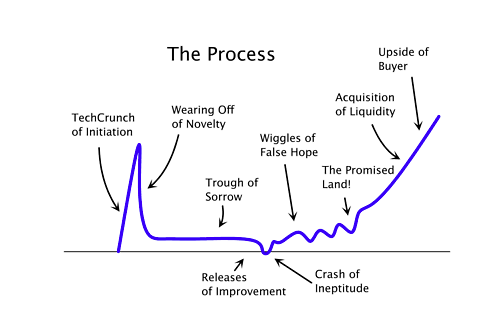
Fred Wilson wrote a great article on this this morning. The graph is from Paul Graham. Together they are two of the best thinkers on start-ups and technology business today. The curve looks all too familiar:

Infinity Softworks has been through this curve. While we didn’t have a TechCrunch initiation, we definitely had this spike in 1998-2001 as we ramped sales on Palm OS, expanded the product and formed incredibly good partnerships that meant massive distribution and awareness. Then everything flattened for a few years before the bottom fell out in 2005 and our crash of ineptitude occurred in 2007 when we tried to develop a math education Windows and Mac product that no one cared about and a BlackBerry app that made the sound of a deflating balloon on launch.

We began to recover in 2009 (not before we both spent a brief time consulting for someone else to make ends meet) with our iOS app and hit the wiggles of false hope when the iPad launched in 2010. We’ve been in those wiggles ever since.

Come on, Promised Land! Papa needs a new pair of tennis shoes!