powerOne and the 4″ Screens

On September 12, Apple announced the iPhone 5 and said the first customers would receive it on September 21, nine days later. This is a very tricky time for developers as we have no idea how the device will behave. While we have simulators to get a feel for the device, there is no way to know whether the changes we will make will actually look and work well on the device until we receive it. The only thing I knew for certain is that apps that are not enlarged for the 4″ screen would look horrible, or at least they did on the simulator.

To a much greater extent, I had this same problem with the iPad. That was significantly harder, though, as it was a completely different form factor. At that time we decided to wait until the iPad shipped to expand powerOne to work with it, or at least that was the plan. In the end we had product on day one only because of Apple’s generosity.

For the 4″ screens we decided to throw caution to the wind and expand the app. Turns out it was the right move as the simulator was a fair representation of the taller device. (It also turns out that at least on the black iPhone 5 the 3.5″ screened apps don’t look bad at all.)

The first thing we did is add the extra splash screen graphic Apple asked for. This is what tells iOS that the app works in full screen. Very elegant solution on Apple’s part. Once added, we could see right away what worked and what didn’t. All but three screens — the portrait and landscape calculators plus graph view — worked. For graphing it turned out that the screen coordinates were hard-coded. That was an easy fix as now we just query for the device size instead.

The calculators were trickier. We had to make a fast, near-term decision about what to change and we had to make sure whatever we changed didn’t have a massive impact on the rest of the view and app as we didn’t have much time to test it. We had 11 apps to get back to Apple and all be reviewed before the iPhone 5 came out. [1]

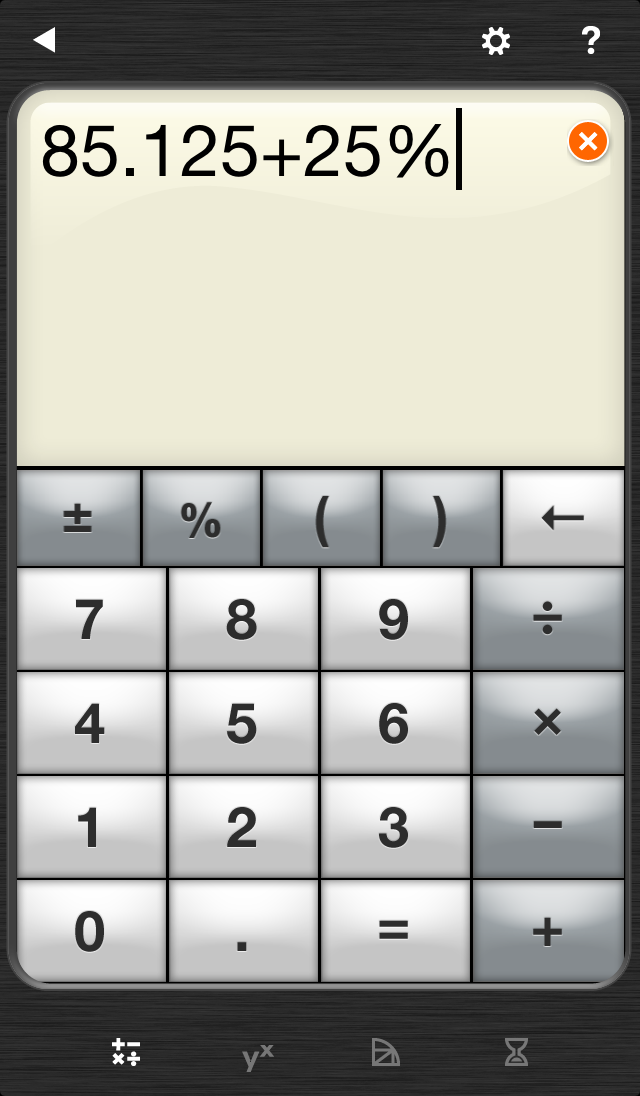
We basically had two choices for the portrait calculator: expand the view window or expand the buttons. We decided the buttons were easy enough to hit at their size and thought having an expanded view window, especially for RPN customers, would be nice. You can now see four stack rows before scrolling. This also happens to be the least impactful thing to do from a coding perspective.
For the landscape calculator we thought about a number of possibilities, including moving the navigation buttons and some other possibilities. In the end we decided that the biggest problem with landscape calculator is the button size, especially for 0-9 and the basic math functions. There we decided to expand those buttons to fill the extra space, which also enlarged the view window a bit.
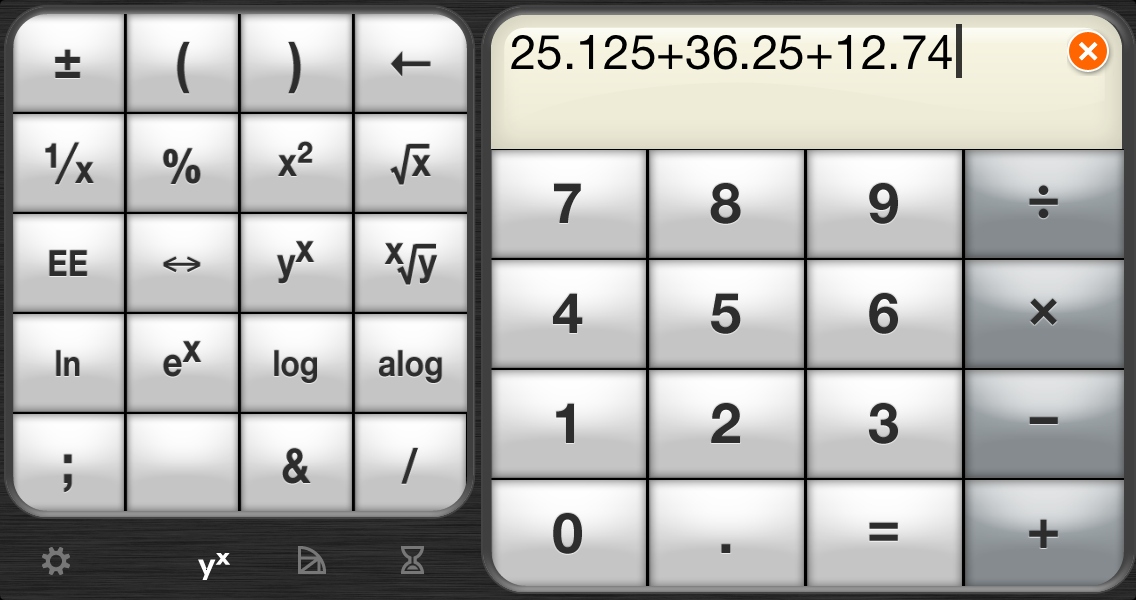
Of course, I had no idea until Friday the 21st what any of it would look like. After all, the simulator gives me an idea but it isn’t until I put it on a device and play with it that I know whether the changes were effective. I’m happy to announce they are, especially for landscape calculator. It in particular is significantly easier to use.

[1] Why the rush? Partly because powerOne was badly broken on iOS 6 and we had to get a release before it shipped on Sep 19, two days before the devices arrived. I really didn’t want to do two releases so close together.
Breaking Down Android Devices and OS Version [Survey Results]

As I have mentioned before, we have begun work on an Android version of powerOne calculator. Over the past few years we have accumulated a list of about 375 people who emailed us requesting an Android version of the app. To help get a feel for what is out there we conducted a brief survey. The response was incredible, over 50% response rate.

Two questions, I think, are most pertinent for sharing: 1) What device are you using; and 2) What operating system version does it run? Obviously this is a very small sample of people who were self-selected and are primarily in the United States. This data may not match the Android market at large.

Devices

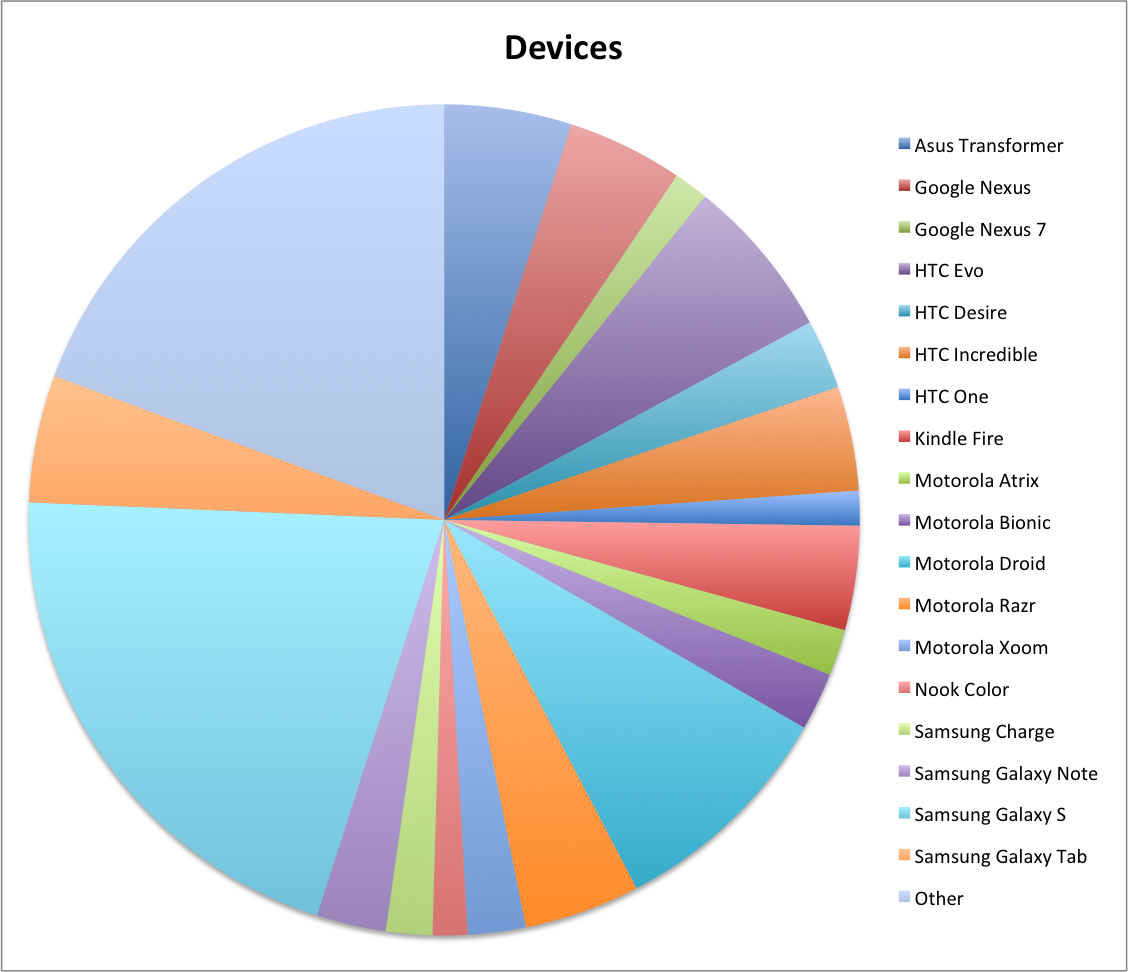
The devices were scattered all over the place. The average per person was 1.2 devices per person, which means that one out of five responders had two devices. The most popular device series in use was the Samsung Galaxy S series, followed by a wide margin by the Motorola Droid devices and HTC Evo series. Of the tablets the Asus Transformer was the most owned followed by the Kindle Fire. Not surprising at all. There were a few votes for the Nexus 7 and a few more that said they would buy one in the future. Here’s the breakdown:

Other is just slightly a smaller pool than Samsung Galaxy S, an amazing array of devices.

Operating Systems

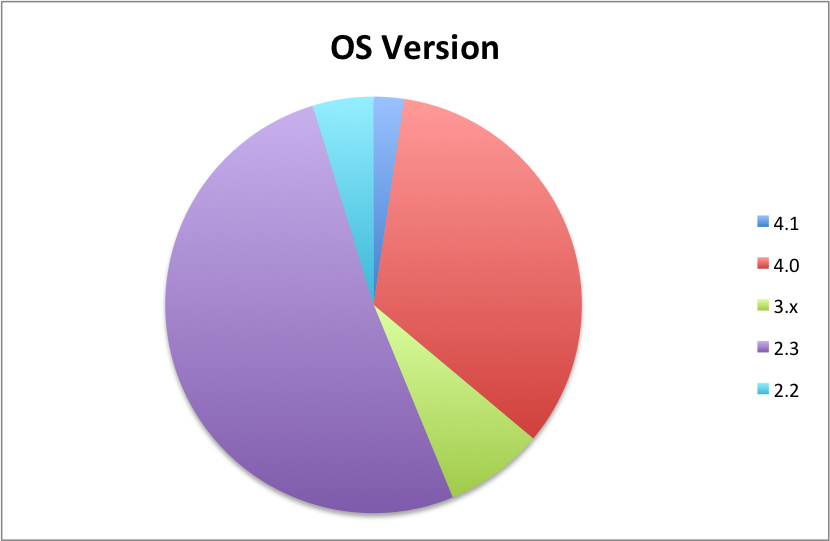
Luckily the operating systems were much more straight forward. There were two primary OS versions: 2.3 and 4.0. Apparently a few vendors are releasing 4.0 or 4.1 operating system updates as a number of customers mentioned that they were updating their OS version soon. Personally, I was pleasantly surprised by the uptake of Android OS 4.0. Based on all the public data I’d seen it looked like 2.3 was very dominant and 4.0 had little uptake. At least this group is reporting differently.

powerOne is the kind of app that cares less about the device and more about the screen size and OS version. powerOne doesn’t have streaming needs or heavy networking needs so we generally don’t have to worry about minute changes between devices. This is why I care more about the OS version data here than the device data above.

What We Have

Since I shared what this self-selected group has, I would be happy to share what we have here, too. We have three devices: a Samsung Galaxy Tab 10.1, a Samsung Galaxy SII and a Nexus 7. The development is being performed by a partner and they have a plethora (I love that word!) of additional devices. The OS version is 4.0, 2.3 and 4.1, respectively.

Other Questions

As mentioned above device and OS were the two primary questions. We asked two others. The first is does your device have a hardware keyboard? About 10% of devices did. The second was more pertinent to powerOne: do you use RPN input mode? There were three possible responses: not important, prefer it but can live without it, and it’s a requirement for me to buy. 23% said it was a requirement. 48% said it was a requirement or preferred. I have no doubt that this is very high for the calculator population as a whole but the HP12c had a huge influence on the financial calculator market specifically. I’m sure many in this self-selected group were heavy 12c users before our software and the PalmPilot came out.

Of Android and powerOne Praise

We just completed a survey of some customers that requested an Android version of powerOne. I’ll report on the data soon but in the meantime there were a number of responses similar to this:

Elia, I don’t yet own an Android phone, partly because I can’t get powerOne on one!  Your release of powerOne on the Android platform would make me look seriously again at making the switch from the iPhone. Michael

Thanks, Michael. No kinder words about one’s product can be spoken.
Yes, we are developing a version of powerOne calculators for Android smartphone and tablets with a likely release near the end of this year. If you are interested in being in the beta and/or be informed of its development, please email us here.

Search Changes, Falling Sales and a powerOne First (With Data!)

Last week Apple changed their search algorithms in the App Store. Within a few days, apparently realizing the changes weren’t such a good idea, Apple changed them back. We got caught in the middle on this one and it greatly affected our sales. We were down 30% at one point last week and never really recovered even after Apple changed it back.

What happened? In a nutshell Apple stopped using the title as keywords where they had in the past. Since we use words like “calculator” in our title we didn’t bother including it in the keywords, where we only have 100 characters to work with. So a search for “mortgage” showed us high but a search for “mortgage calculator” didn’t show us at all.

The fundamental issue is that search position and product sales are tied together. If you get caught in a downward trend on one than you also get hit on the other since product sales are a factor in search position.

In order to combat the problem there is only one solution: stimulate a bunch of sales over a sustained period of time to try and get the rankings back up. So we dropped the price of our Pro products to US$2.99. This is the first time in the three+ years of selling powerOne calculators on iOS that we have dropped the price. In all fairness we were considering a price drop anyway. It seems that $2.99 is becoming a premium price point. If all we do is maintain the same revenues with more customers it is a net gain for us. More customers means more people talking about powerOne which hopefully means more customers.

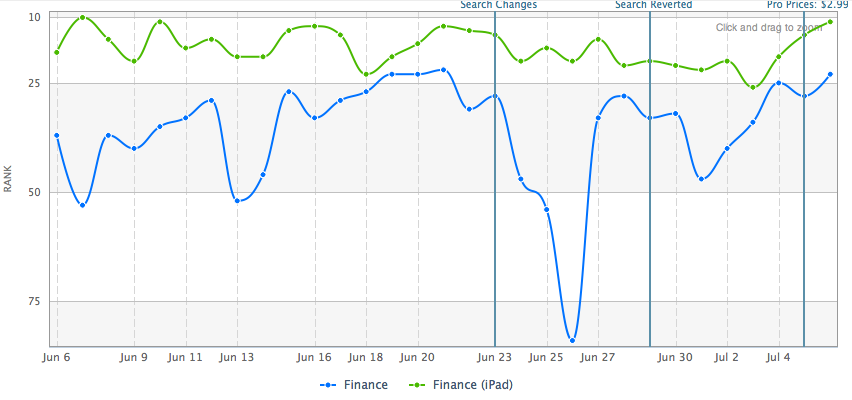
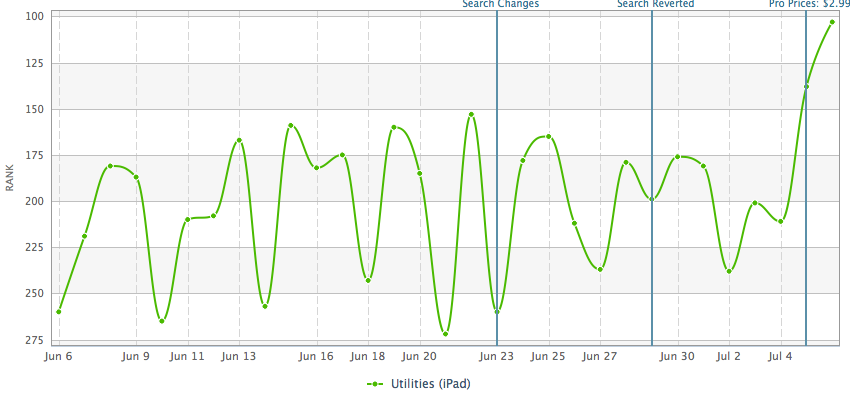
It’s very early but I thought I would show the impact of the top paid position for our two top selling products, powerOne Finance Pro and powerOne Scientific Pro. This is the US App Store for the Finance category for powerOne Finance Pro (the top graph) and the US iPad store for the Utilities category for powerOne Scientific Pro (bottom graph):

Both graphs show the same time frame with search term changes and price changes marked. We don’t sell enough powerOne Scientific Pro to rank on iPhone app store so didn’t include it. powerOne Finance Pro is by far our best selling product and is the one that has been featured by Apple numerous times. The impact of the search changes is especially pronounced on the iPhone version of powerOne with barely a blip on iPad. This implies that search is more important to us on iPhone then on the iPad App Store.

It is early but the dive toward #1 is very pronounced on both App Stores with the price change. On last check, powerOne Finance Pro was #25 and #4 in its category on iPhone and iPad respectively, and powerOne Scientific Pro was #82 on iPad in the Utilities category. (We still don’t rank high enough to be seen in its category on iPhone.) We haven’t been ranked this high in the Finance category since 2010. This means iPhone has likely leveled out (or peaked) in the Top 25, a very good place to be since the iPhone on App Store shows the top 25 on the first page. Meanwhile, on iPad, our rankings are still moving up the charts.

Again, it is too early to draw any conclusions. We may find that after an initial burst of discount seekers our sales fall back off. We should know more in the next couple of weeks.

[1] Two straight tough weeks for Apple. Apple uses a digital rights management technology to wrap apps before they go in the store. Something happened this week that made downloads impossible to run. Luckily we dodged the second bullet. We had new releases ready to go, too, but when Apple fixed the search problem we cancelled the releases. The downloads affected ran from July 3 to July 5.

Watching The Apps Go By -or- 2 Of The 3 Percenters

Apple hooked up 100+ iPads and had them scroll through the top 20,000 apps downloaded since the beginning of the year. That’s about the top 3% of all apps. In years past they had a big board where downloaded apps fell from the top. I liked this one much better! Downloaded apps would twinkle for a second or two, at 100 downloads they would create a ripple. You could even press down on a spot and make the app icons jump. For some reason my video imported sideways:

Not only was the display cool but we found both powerOne Finance Lite and powerOne Scientific Lite in the list. Quite an honor!