John Gruber in his Apple iPad/Macbook event observations said:
Why would anyone buy [an iPad 2]? That’s a better question. Two groups that I know are buying it are businesses using iPads for things like cash registers … and schools. For the cash register scenario, it’s perfectly rational for the business to want the cheapest full-size iPad they can get. They don’t need retina, they don’t need more than 16 GB of storage, and they don’t need cutting edge performance. For schools, the logic seems unclear to me.
John went on to say that he has heard schools want the cheapest full-sized iPads they can get. I’m sure that’s true but that isn’t the underlying factor that drives educational technology buying decisions nor why Apple is keeping around a three-year-old device. After all, Apple could take last year’s iPad and drop it to $399 instead.
I spent years talking to schools and teachers in the Palm OS days and only because of that experience do I feel even remotely qualified to talk about this topic [1]. The educational system here in the US works under a very different set of guidelines than what the business world does.
The basics of educational buying are pretty straight forward. Will the technology provide an appropriate educational environment for students? Can schools control the devices as much or as little as they’d like? Is the cost within the budget of the grant or purchasing agent who will spend the money? (I say this oddly only because in many cases it is not the school or district purchasing but the purchase is made through a parent organization, grant or other funding body.) Is there training (professional development) for teachers? Is there education materials available for the technology?
The iPad, iOS and App Store have nailed all of these [2].
In addition to the multitude of decisions I listed above — and that is only a subset — there are two other considerations for any hardware company that I want to talk specifically about today: time and equity.
Time
First, time. In most educational technology purchases it takes years to make a buying decision. In my experience the process looks something like this:
- In year one, a teacher or two who are technologically advanced get devices and check out the educational applicability of the systems. This includes writing some curriculum around it or downloading apps to play with, etc. Maybe these get used a little in class, maybe not.
- In year two, the school will try the devices in a classroom with a handful of devices. Traditionally these have been shared devices but sometimes schools can get a cart (20-30 devices in a rolling box that can be moved from classroom to classroom).
- If that goes well then grants are prepared in the third year.
- By the fourth year, assuming the grants are received, then the school can purchase more of these devices, either to be used across multiple classrooms in carts or one per student. There have been very few technology roll-outs on a one-to-one basis so far in the US. The most successful technology roll-out in education ever has been TI calculators.
- If it is very successful in schools, then other schools or even the district will consider purchases.
This is a generalized schedule, of course, but should give you an idea. The trick is that they are evaluating a certain piece of hardware. It is not easy for a school to suddenly have to buy a different system model three or four years into the decision process. When confronted with this problem, most schools just don’t make a purchase decision.
Look at what is the most successful technology roll-out in US educational history: TI calculators. These devices began appearing in schools in the early 90s and are as close as we have to a device that every (high school) student carries. The TI-81 shipped in 1991. The TI-84 ships today. That’s four generations in almost 25 years, and all of those devices look and act almost identically when considering core functionality:
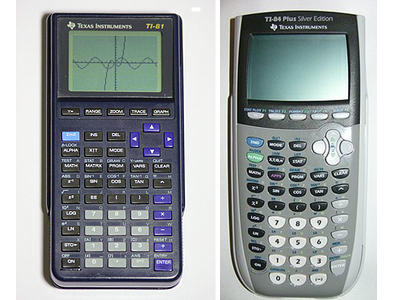
Where does this leave the iPad? Somewhere in the middle of the buying cycle. While the iPad mini and iPad air keep changing on schools and forcing them to consider new devices during the period they are trying to purchase, the iPad 2 remains beautifully the same, keeping a reliable device on hand for them to consider. Even with that iPads look amazingly like TI calculators from the consistency perspective:

It is hard to tell the first generation device from the fourth generation device. On top of that OS 7 runs on almost every one of them.
This isn’t the only time consideration, by the way. Once the devices are purchased they have to work for years afterward. My daughters’ elementary school is using six-year-old laptops for students. The money just isn’t there to buy replacement systems every couple of years.
This, too, is a mark in Apple’s favor. The devices will keep functioning years down the line [3].
Equity
As if the buying cycle wasn’t hard enough on companies trying to sell to schools, there is another issue in schools that generally goes unmentioned: equity. In the US our educational system does not make choices for the students, or at least tries not to. We generally believe that a failing student today could be a straight-A student tomorrow if the right motivations are applied. We don’t decide that a student who is behind in mathematics in seventh grade is not allowed to take the AP Calculus exam as an eleventh grader.
This is US education’s blessing and curse. And when it is applied to technology it adds an extra strain on the company providing it.
In US schools we don’t say a certain group of students get to use technology and another group do not for academic reasons. We generally say that technological curriculum is appropriate at a certain academic level instead. That means all devices for a specific academic level must be the same.
My daughters’ elementary school bought 40 iPad minis at the end of last year and those systems have mostly been used by the fourth and fifth grade classrooms. Realizing they could use about 10 more devices, the school moved forward with purchasing this fall. I advised the principal to wait until after the October 22 event, believing that retina iPads would replace non-retina iPads and be better bang for the buck, so to speak.
Our principal reminded me that that didn’t matter. What did matter is that all students were using the same devices, that teachers didn’t have to know one thing for one group of devices and another thing for another group of devices. Even more important, she didn’t want students fighting over who gets to use the nicer devices. [4]
I had completely forgotten about the importance of equity, the importance of schools not deciding for their students what the future will be, and that plays out in everything the school’s do, to the point of inspiring a school to spend on last year’s technology rather than today’s.
Palm’s Failure, Apple’s Win
I learned in my years of selling to schools these important lessons. This was a major problem for Palm in education. Every time a school was ready to make a purchase decision, the devices they were evaluating were gone and new devices took their place. A whole new decision needed to be made. To make matters even worse, the devices changed drastically from generation to generation, with different connectors, device sizes and layouts. Even three devices all shipping at the same time would have completely incompatible connectors.
While decisions based around timing and equity generally don’t play out in the business world, they play a major part in education purchase decisions. Apple, who has sold to education a lot longer than Palm did, clearly understands this. Connectors have remained relatively stable, every iPad basically look and function the same, devices are kept around for multiple years to facilitate the purchase decision, and they function for years afterward so schools can get their money’s worth [5].
—
[1] I spent four years or so pitching schools on the idea of replacing TI calculators with Palm devices with powerOne Graph calculator software.
[2] Although there have been hiccups.
[3] A lot of districts have purchase contracts with Apple, too. Those schools won’t consider non-Apple hardware. This is done to minimize the training, repair and support needs across the district.
[4] It turns out she didn’t get the PO in before October 22nd, which worked out as we save $30 or so per device since the non-retina devices stick around.
[5] Yes, Apple changed connectors but offers an adapter to keep using the old ones. This is a knock against buying the iPad 2, though, and am surprised that Apple hasn’t at least swapped out for the new connector. And yes iOS 7 is a huge change for schools. Again, since iPads are relatively new in education, I’d bet Apple doesn’t see this as a huge problem. Almost all purchase decisions will occur with iOS 7 or later.
 Elia Insider