Controlling Content Editable

I’m burned out. I busted my rear end last week writing a piece of code that has been a major problem for us. Equals uses a web technology called content editable. In short it allows a developer to segment a section of a web page and say that the user can type there. It is similar to a text area but content editable allows for rich text editing (bold, lists, headlines, etc).

The concept of content editable is amazing but there are a couple of major problems with it:

  1. The standards are different across browsers. How returns are treated, for example, is completely different on WebKit (Safari and Chrome) than IE than Firefox. I haven’t even tried it on Opera and other browsers.
  2. The cursor is a foreign thing to most browsers. Except for text areas and text fields, we were never really meant to be able to see a cursor on an HTML page.

We had to make a number of very difficult decisions here and have to admit that one of the reasons Equals is taking longer than we anticipated is simply because we ended up re-writing most of the way the note is handled. Equals relies heavily on every line having an appropriate container, whether that is a div, a p, or a header tag.

When we started out we thought we would write our code to control the cursor and then would modify the content editable area as we went along. But what we found is that controlling the cursor is very difficult. Since controlling the cursor isn’t well supported [1], making sure it always does the thing we want it to do is dangerous. We had all kinds of weird behavior.

Furthermore, the original code we wrote for this is the first Javascript code we had written. What a horrible way to get our feet wet! Upon further study, it became clear that there was a better way to write this portion of Equals, one that would be much more stable, much more portable, and allow us to do things in the future we couldn’t fathom doing today with the original code.

So a few weeks ago we decided to re-write it. The goal was to generally let content editable do what it wants and then adjust after the fact. We also moved more HTML out of the content editable area, which will stabilize the content and make it easier for us to handle stuff like copy and other across-document functions.

We also found that how we start the HTML within the content editable area makes a big difference on how the browser forms its HTML. It will repeat that first line for every return key if set up correctly. Firefox, though, prefers <p><br></p>, Safari and Chrome prefer <div><br></div>, and IE prefers <div></div> without the break. It also matters when this is set. Firefox and IE don’t seem to care, but Safari and Chrome require page load.

Once I figured this out, other pieces fell into place and typing notes became routine. It all just worked. I took 750 lines of code and reduced it to 150 lines of code. I even was able to handle cut and copy correctly.

Until a user pasted something into the content editable area. Then all hell broke loose. And that’s why I’m burned out.

Last week I wrote 150 lines of code, all of it dealing with the process of pasting [2]. The problem with paste is that it pastes whatever it has in its paste memory buffer, whether that is well-formed HTML or not. Again, I didn’t want to control the contents of the paste. So I let the content editable do what it wants and then, after the fact, go through the entire document and clean it up [3].

The edge cases are ridiculous on this one and I have only tested it in Safari so far, but the code feels fairly solid. It handled a plethora of variations and bizarre behaviors. And if it does end up working out, I have a nice function we can call if an Equals note does get out of whack for any reason. Here’s hoping the code stands and I don’t have to patch it further. This 150 lines could be spaghetti code really really easily.

[1] If you need to deal with cursor stuff, I highly recommend Rangy. We still use it some but not as much as we did in the first revision.

[2] And undo and redo, technically, although I consider both of those a side-benefit of fixing paste.

[3] I thought of alternatives like pasting into a hidden text area, cleaning up the code, then moving it into the content editable area. That may still be an option if my way fails completely in the end. But that required me to control the paste process, and that is something I wasn’t comfortable with having control over in all browsers.

Failing… Again

A week ago we launched an update to powerOne. It was mostly bug fixes and a couple of other things. I screwed up one of the fixes and tried to re-fix it late last week. In the process I swapped out one file provided by a third-party (Flurry). I didn’t think much of it and released it to Apple. They reviewed it quickly and released it. Saturday a couple of reports came in that the app failed to launch on iOS 5. I quickly added a message to the What’s New dialog in iTunes, fixed that problem and released it to Apple again. It’s awaiting review.

I’m frustrated, mostly with myself but a little with Flurry and a little with Apple. Look, the bug was my fault. I failed to test a use case, a use case that turned out to be a pretty big one (using it on an entire OS version). Flurry gets a little of my angst, though, as they made major changes in a point release that broke the app if not set up properly, and then failed to mention how to set it up properly. And a little of my angst is aimed at Apple. What kind of review is this if you don’t even run it on the operating systems it is available for? And why can’t you, after six years of the App Store, give me something to help me out when I screw up, like maybe allowing me to roll back to the previous version?

But mostly I’m upset at myself. I failed to perform a very simple test. I released a new version without completely testing one of the changes. The number of things I am doing is piling up bigger than me. In an effort to get one of them off my plate I rushed and screwed up. I’d like to say this is the first time but it’s not. I’ve done this before, although never to this extent. And that’s the part that is really inexcusable. I’ve failed to learn from a lesson I’ve learned before.


Introducing Equals or How We Will All Work With Numbers In The Future

I am proud to introduce you to Equals. Our goal with Equals is to make working with numbers as easy as writing sentences. While we only have a web site up right now, the products and services are coming soon. Please email me with any comments or feedback, and hope you will be interested enough to sign up for notifications at the Equals web site.

We have had many successful years developing powerOne calculators, combining aspects of spreadsheets and calculators into the template format. But the world has changed drastically over the past few years, especially since the iPhone App Store launched in 2008. powerOne was built and designed for that pre-App Store world.

We’ve been looking for something new for a while, something we can build a long-term business around, one that fulfills my thesis that the tools we use to work with numbers need to change just like the PCs we use those tools on have. A few of the reasons we are so excited about Equals:

Customization

Screen Shot 2013-08-13 at 8.57.52 AM

What made spreadsheets incredible is that, while they still required some basic algebra (B3 is nothing more than a variable, after all, no different than X), it allowed customers to craft spreadsheets concretely. Enter a value into B1, another into B2, then add them up with a simple =B1+B2 formula. Immediately the customer can see the results, even change B1 and B2 to see the impact.

powerOne… not so much. In powerOne the scripting language is more akin to programming. The author must think through the entire calculation, remove the equations from the data, and craft the template. Then he or she can plug in numbers to see if it works. This is hard for most people to visualize.

Equals is more like a spreadsheet in this regard. It is much easier to build calculations from the data. But we wanted to take this a step further. Could we start making variables look like sentences so customers didn’t even need to think in algebra at all? In Equals I can name a variable anything, with only a few limitations (for now):

2013 Q4 Sales
Interest Rate
Avogadro’s Number
Acceleration

It worked so well that after a few sessions with Equals it became clear that I could read notes just like I was reading a page with text. I could understand the variables, understand the equations, whether I wrote them or not. This opened up calculations so not only can anyone write one, but anyone can take someone else’s note and customize it to their own needs. This is critical. Life is custom, after all.

Finally, we realized that the way people looked at the numbers physically is different. powerOne and Excel both expect to see calculations in a very specific format. Sometimes that format made sense and sometimes we copied and pasted numbers into Word and other text editors to layout the numbers.

This is no good. These arbitrary barriers between form and function were designed for an era when computers could only handle one or the other. That’s not a problem any more.

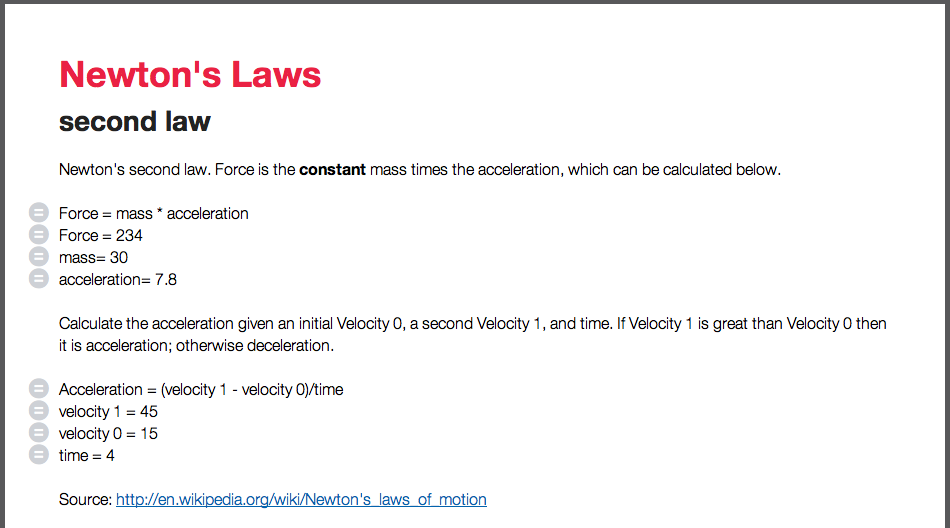
Newton's Laws

Internationalization

powerOne is filled full of text. There are thousands of words of help, template descriptions, labels and more. The cost to bring powerOne to a language other than English was astronomical, let alone our lack of understanding of certain calculations in other countries. Back in the Palm OS days we weren’t hurt horribly by this fact. Now, though, non-US sales of apps, by some reports, account for most app revenue.

One of our goals with Equals was to get Infinity Softworks out of the middle of this localization. The apps and site we are working on is more iconic, less text-centric. The product is your notes, your calculations. Let them be designed and presented in the language of your choice. There will still be some work on our part to localize Equals. That’s fine. Just so long as it isn’t overwhelming.

Cross Platform

As if localization wasn’t bad enough, powerOne is a bear to port. At a minimum we are looking at six months of intensive work for multiple people and that doesn’t include on-going maintenance and support. iOS couldn’t pay the bills around here. Android has been even worse. The motivation to develop for any other platforms is at an all-time low.

When we started working on Equals one of our goals was to make sure we could move across platforms more easily. We focused on putting as much of the technology in HTML5 and ANSII C so we could run it on multiple platforms more easily. This doesn’t mean everything is in HTML and C, however. It means certain core technologies are. We are testing this immediately with both iOS and web versions. We are excited to add Android and other platforms as well.

App Stores

App Stores are an unbelievable resource. The iOS App Store eliminated 70% of our support burden just by handling the install and reinstall issues we encountered in the past. While the App Store is an amazing resource for distribution, it is a horrible resource for making a living wage. We are excited to introduce a product and service that we think is not just valuable to customers but also sustaining for us as well.

In addition, getting out of the app stores allowed us to think more broadly. What does it mean to share calculations? How could this be done easily? What would be an appropriate business model that allows us to get paid and for customers to have a valuable product, whether or not the app stores will support that model?

Don’t get me wrong. The app stores have their place. We just intend to use them for what they are really good at.

Valuation

Long Life

I like products I can think about and work on for a long time. After 16 years, powerOne has reached the end Yes, there were some things we could do to it, features that customers wanted, but the big ideas were already there.

Equals is exciting to me. It has long legs. The way customers will use it, the enhancements we can make to improve it from collaboration to data to integration with other services, gives me years and years of material to work with.

I hope you are excited. Equals ushers in a whole new era for working with numbers, one designed for the web and mobile world we all live in today. The site is ready for your review today; the service, mobile and web apps very soon. I hope you will check it out and tell me what you think.

The Sacrificial Lamb

In 1997 when I started Infinity Softworks, I actually intended to write a personal money tracking application, the first of a suite of finance applications that would include investment tracking, expense tracking and more. Palm OS in those days, though, was hard to work with and I was very inexperienced in the ways of event-based software and record storage. I became very frustrated very quickly and started looking for another project to work on that would be easier to implement and decided to write a financial calculator. I could use the simple storage mechanism (preferences) instead of a database and could focus on understanding event-based programming specifically and Palm OS in general.

It took a while and a number of things happened to slow me down, but eventually I completed the app and started thinking about selling it. To you youngsters you may not realize this but once upon a time how we sold apps was less clear cut. There wasn’t just an app store to upload it to and be done. We could package our own apps on floppy disc or CD selling them directly, we could build and sell off our own websites, we could find a partner to take us into retail, we could sell through a few online locations. We did the obvious stuff, creating a site, uploading to various online resellers, and setting up an 800 number to take orders and mail those out [1].

Retail, though, had the most potential in those days. There were two retail channels we considered: physical stores (like CompUSA and Office Depot) and catalog stores (like MacMall) [2]. There were huge risks and huge rewards but just like the app stores now, every retail outlet was clamoring for things to sell next to those hot selling PalmPilots. We had no money to do it, though, and it took a lot of money.

Lucky for me, my business partner at the time grew up in Silicon Valley and his dad sold software for large companies. He agreed to help us with our first deal and found that Macmillan Digital Publishing was doing Palm shareware packs and selling them through retail stores. Instead of us building our own retail presence, he helped us get our first deal — one of seven apps in the PalmPilot Business Pack.SWBUSPALM

At the time we only had one app, an app that came to be known as FCPlus Professional, a full-featured entry-level financial calculator. I fretted over including the entire application in the Business Plus Pack as it was our only potential source of revenue at the time and, after six months of working on it, I hadn’t made a penny yet.

“You may need a sacrificial lamb,” my partner’s dad told us.

I remember having no clue what he meant so he explained it to us. We may need to consider a version of our app that we could use for promotional purposes. We’d give the app away for free (or make little money off it) with the hope of selling other complementary products. He also thought the potential was there to sell the app to a third-party outright, and then use those proceeds to build other things we wanted to do. So instead of bundling FCPlus Professional, we designed a slightly lesser version called FCPlus and bundled it with Macmillan’s packs. It was a fully working financial calculator, just with less features than the Pro version. We didn’t make that version available for purchase directly from us or anyone else at the time, but we did offer half-price upgrades to those who had it.

Six months after we launched FCPlus with Macmillan, Palm came calling. They were going to put together an add-on pack of software and bundle it with every device. There were two available financial calculators on the market, ours and a competitor. They wanted ours but if we didn’t agree to give it to them (yes, give) they would go to the competitor. We were backed into a corner.

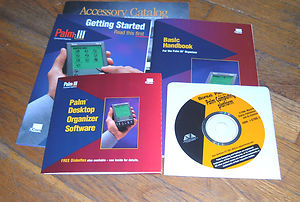
bonus pack

The “sacrificial lamb” comment came right back to me again. We reluctantly agreed to include FCPlus with every Palm sold, feeling like we had no choice. It turned out to be a very smart move on our part and over time we figured out how to make the freemium model work for us. [3]

Fast forward 15 years and Infinity Softworks as a company is in a massive transition. Over the next few months we will release a version of powerOne calculator that looks and feels right on iOS 7, re-designed and developed from the ground up, and a new application that we think is our future, an app that is the culmination of 16 years of learning about how people work with numbers and how we can improve that process.

I can’t help but think about those words once again: “You may need a sacrificial lamb.”

[1] We didn’t sell electronically off our site, though. In the early days we couldn’t get online credit card processing so the website form came to us via email and then we entered the card manually into the machine in a closet. Very secure!

[2] Almost all of those retail stores are gone now, and the ones that remain don’t sell much software anyway.

[3] Although it wasn’t known by that term for almost another decade.

powerOne Calculators for All Android Devices, Kindle Now Available

powerone_android

I’m proud to announce that powerOne calculator are now available for all Android smartphones and tablets, including Kindle Fire. Details and links to purchase are here. I’d like to personally thank all of our beta customers who helped make this a better product. I’d also like to thank Samsung for making it possible!

If you are not aware, powerOne is an extremely powerful and flexible calculator. The calculator itself includes everything from basic math to fractions, feet-inches, matrix math, complex numbers, programmers math, matrices and more. Many of the calculations are split into templates, designed like mini-spreadsheets. There is a collection of over 400 available to download or create your own. Categories include finance, mathematics, scientific, business, investing, real estate, construction and others.

Buy today from Google Play or Amazon Appstore!