The Single Box Theory of Software Design

I would like to propose a new software design principle I would like to call The Single Box Theory. My Theory is as follows: the closer your software can get to using a single box the more likely it is that customers will adopt it.

Google Search has a single box and is brain-dead simple to use:

Twitter is the same way:

The closer our designs gets to a single box, the easier the product is to use, the less explanation it needs, the more magic the app appears to have.

I’m not saying this is easy. Email has three boxes — to, subject and body — and most people believe this is as good as it could possibly get.

But is it? Here is Facebook’s Messages interface. It has only two boxes:

I find it weird to think that two boxes is that much simpler than three boxes but it is. One less box to fill in means one less decision to make, one less minute to complete. It means the customer is way more likely to use it.

The problem with multiple boxes is that only the most anal retentive among us will be willing to fill them in. I don’t want to spend my days figuring out which boxes to fill in with what data. I just want it to be done. How many people fill out all the appropriate iTunes info?

Or fill in all the contact info every field the Address book asks for?
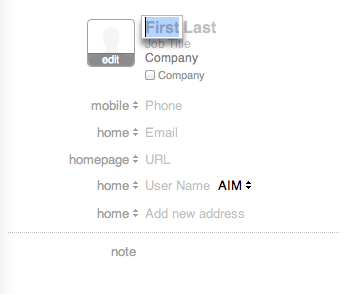
I believe most people’s Address Books, for instance, have half completed data and information in it. Very few people really want to take the time to make sure it is all entered and it is all accurate.

But structured data requires multiple boxes, right? After all, I need to tell the service what goes where so it knows how to catalog the information, make it sortable and searchable, transform it into reports so I know how I am doing. Here is a screen shot from Highrise:

How could a product like this get away with fewer boxes? I won’t say it is easy. I will say it is necessary to make a product more usable, though, and to get more people to adopt it and stick with it.

As developers we need to work a little harder, think a little longer, about how to reduce the number of boxes. It is possible. Take a calendaring application. Traditionally it has lots of boxes: event, location, date, time, from, to, etc:
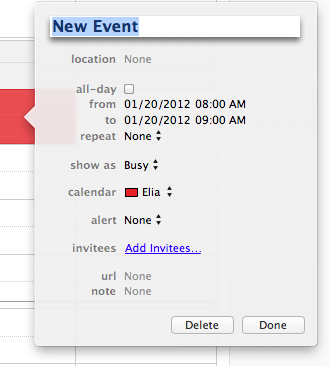
All of this seems necessary but it isn’t. Think hard about the 90% rule: what will people need 90% of the time and satisfy that need while also making it easy for the anal retentive among us to get access to the rest. Even something as reliant on structured data as a calendar app can accomplish this:

It is amazing how many boxes we can eliminate when we put our minds (and programming muscle) into it.

2012: Ending the Gatekeepers

Over at avc.com, Fred Wilson commented that he thinks 2012 will be the year that the movement goes mainstream. He sees five events — Ron Paul’s rise in popularity, Occupy Wall Street, Reddit as an populist building community and a couple of technology things —  as setting us down this course.

While I agree with Fred, I latched on to a comment by Lucas Wilk:

It all ties in with the big theme, the megatrend as you will, which is the end of gatekeeping of just about any kind. Legacy structures based on keeping the information flow from top to bottom are being made obsolete in the areas of broadcasting, publishing, commerce and now mass communications . The world is clearly becoming more horizontal and rapidly decentralized. [italics mine]

I’ve been staring this trend in the face for the past year and have been unable to put a definition around it. I’ve been calling it “when the app comes to you.” In short, our world is changing from one where we go to an app to get things done to one where the app comes to us. In the old days to send an email we would launch an email application, wait for it to appear on the screen, type in the name, subject and body and send it. Now I click a link in an app or web site and an email client launches right within the application I am working within. No switching apps, no splash screens. I do my business and move on.

There have been a number of technologies and apps that have made this “app come to you” possible. To save something to Evernote, I choose an icon on the menu bar of my Mac. To post a tweet to Twitter or save an article to Instapaper, I just choose that option in any number of apps I have on my phone or iPad. To read my articles every day, I don’t go to 200 different web sites. I grab them all in one central location using RSS. Even the web, using technologies like WebKit, now appear in my app explicitly instead of me going to a browser. Siri is just the most recent example of this. Ask it for something and it will try to take care of it, interacting with any number of web sites, apps and services to get that done.

Except calling it “when the app comes to you” isn’t particularly elegant and doesn’t encapsulate what I am seeing. What this really is is the end of gatekeeping. We now expect to interact wherever we are, in whatever context we choose. And that applies for everything: software, hardware, politics, learning, entertainment, sports. You name it we want the gatekeepers banished.

2012 is just the beginning of this movement. But Fred is right. This is the year for it to go mainstream.

Craftsman in the Modern Era

I have been reading a survey book on American History (vol 1 and 2) (along with a tomb on the Civil War and John Adams) and one of the things that struck me from early pre-US history is how we used to have craftsman. In those days we worked our way up from apprentice to journeyman to craftsman. We don’t call ourselves craftsman anymore and it is a real shame.

The beauty of this set up was the process. Moving from apprentice to journeyman to craftsman took years, maybe decades. Today we rush that process and think we can accomplish it overnight. When I graduated from college I started a company. I didn’t think twice about the process and the things I needed to learn in order to do it successfully. And as I look back now I see that I was really an apprentice for all those years.

Now that whole statement is a bit misleading. My craft is not running companies; my craft is creating great software products. But even there I would say I have been, at best, a journeyman. Yes, we have had some products that had tremendous success. powerOne Graph for Palm OS devices was so popular that our customers still buy PalmPilots off eBay to run it. Our powerOne Finance for iPhone, iPad and iPod touch has a 5-star rating and our line-up of iOS calculator products is approaching a million downloads. But I wouldn’t say I crafted these products. I wouldn’t say that I had internalized the customer experience. I wouldn’t say I understood the magic.

When I started Infinity Softworks I did it because I had no idea what I wanted to do. I started college in the engineering program, majored in business where I came close to getting degrees in four subjects, should have majored in computer science and considered majoring in journalism. While running Infinity I have done ten other jobs, too: accounting, marketing, sales, business development, writing code, writing copy, designing. It has taken me a long time to figure out my specialty and now that I have, I desperately want to hone that skill, to go from a journeyman to a craftsman.

I think we all are or are aspiring to be a craftsman in something. I worked with a woman who was an amazing salesperson. She was definitely a craftswoman at her trade. I have also been lucky to work with a number of amazing developers who were craftsman at their trades. I hope as Infinity Softworks moves forward I once again get to work with amazing craftspersons and hope that I get to focus more and more on my own.

Magic, Inside and Out

I have been thinking about the theory of great products a lot. I would say, in fact, that I have thought more about the craft of creating great products — software and hardware — over the past few years than at any time before in my life. It wasn’t until the last few years that I really started to understand the word “magic” and what it means to a truly successful product.

It is funny to think of this as new learning. Our powerOne Graph for Palm OS devices, written seven years ago, still has a loyal following and customer base. I hear all the time from customers who buy old Palm devices on eBay just to keep using powerOne Graph. And if you ask any of the dozen people involved with that project they would still tell you how amazing the experience was, how liberating it felt as we saw it come together, and how awesome the response was from those that used it.

To me that was luck. I don’t think it was specifically thought through at the time. We were just trying to make a better mouse trap and succeeded. How to repeat that experience — but with a more financially viable product — is what I am striving for.

The magic is what makes a customer stand up and pay attention. Apple has been very good at this and is one of the things I admire about the company. The iPod, for instance, made it brain-dead simple to carry around your entire music collection. Other examples: the PalmPilot gave me personal information at the point where it was needed; Roku streamed web programming to my television with a remote control the same way I watch other television programs; Dropbox gives me my files wherever I need them; Visicalc automatically calculated every time I changed a number; Siri takes care of whatever I need.

What I have come to realize just in the past few days, though, is that magic is not singular; it’s plural.

I believe there are actually two parts — an inner magic and outer magic — and without both parts, a product will fail. The PalmPilot’s inner magic was that it made it brain dead simple to have personal information wherever I needed it. But its external magic was that it fit in a shirt pocket. Before that handhelds were more the size of tablets than smartphones. Siri’s internal magic is that it takes care of my needs. Its external magic is that it does that without me having to type or think about what I need — I just ask.

Without the two, the product is nice but not impressive. Take away any one and there are problems. Take away the inner beauty and using the product becomes a problem. It is not usable. Take away the outer beauty and selling the product becomes a problem. No one will show it to their friends and showing it to friends is what drives adoption quickly.

As I have alluded to a few times here, we are working on something new. We were preparing to ship next week but realized that it is lacking outer magic and needs more refinement. I believe we are on to something big. I don’t want to release a half-thought-through experience.

Bringing the App To You

I have been thinking about a fundamental shift that is starting to occur in the world of software. Instead of you going to the application, the application is starting to come to you.

In the old days, when I wanted to send an email or create a document or calculate in a spreadsheet, you would go to some sort of launch screen, find the application you want to use, launch it and get to work.

It seems in the last few years this is fundamentally changing. It started for me in 2006 when we started working on the BlackBerry. If I created a web link within powerOne, such as how all the help is integrated, it would seamlessly launch the browser and display the content. A simple hit on the back button would bring you back to exactly where you were in powerOne.

But this isn’t really new. You could always do this with email and the Office suite was always linked together, and apps like the old “Works” systems had similar features. Even other apps had an “email” link in them that would launch the email client and automatically create a new address. Internet Explorer and Firefox have always done this.

Given that it was the seamless nature of how this capability worked on the BlackBerry that made me take notice. There was no splash screen, no visible change in app at all, that made this situation unique and started opening my eyes to the possibility]ies.

And as we have progressed through the last few years I am seeing more and more examples. Facebook and Google+ can now seamlessly access my contacts and look for people I know. iPhoto can send pictures to Facebook. The on-device video app can send created content to YouTube. Almost every smartphone and tablet news app makes it seamless to Facebook, Tweet, and email, among other options, a story. iOS 5 will have Twitter integration available to any app that wants it.

To me, though, this is just the start. What happens when all of your apps are integrated seamlessly across the web and device? What happens when you don’t have to deal with files but instead can just say “I want this memory [or comment or post or article or note or contact] over here.”

I don’t hear as much talk of this idea but think the idea of bring the app to you will be a significant driver of innovation on the web and mobile devices as we move forward. So developers… how does your app do this?